droidVNC-NG
VNC server app that does not require root privileges.
Version: 2.22.1
Added: 10-08-2021
Updated: 22-10-2026
Added: 10-08-2021
Updated: 22-10-2026
Turn your Android device into a remote-controlled workstation with droidVNC-NG, a powerful, open-source VNC server designed for local networks. This app offers a versatile solution for remote access.
Remote Control & Interaction
• Screen Sharing: Share your device's screen over the network, with optional scaling on the server side for better performance.
• Remote Control: Use your VNC client to control your device, including mouse and keyboard input. To enable this, you need to activate the AccessibilityService for the app on your device.
• Special Key Functions: Remotely trigger key functions like 'Recent Apps,' Home button, Back button, Power and volume controls.
• Text Copy & Paste: Support for copying and pasting text from your device to the VNC client. Note that server-to-client copy & paste works automatically for text selected in editable text fields or manually by sharing text to droidVNC-NG via Android's Share-To functionality.
• Multiple Mouse Pointers: Display different mouse pointers for each connected client on your device.
Comfort Features
• Web Browser Access: Control your device’s shared screen directly from a web browser, without needing a separate VNC client.
• Auto-Discovery: droidVNC-NG uses Zeroconf/Bonjour for easy discovery by native clients.
Security & Configuration
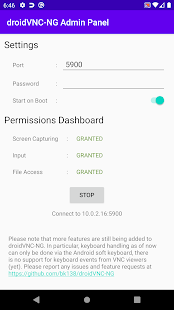
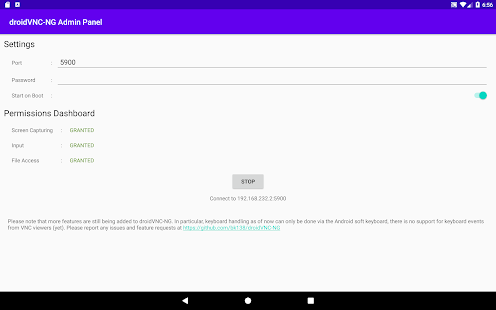
• Password Protection: Protect your VNC connection with a password. Note that setting a password is mandatory in case you want to access the server using MacOS's built-in Screen Sharing app.
• Custom Port Settings: Choose which port the VNC server uses for connections.
• Startup on Boot: Automatically start the VNC service when your device boots up. On Android 11 and newer this also works with kiosk-mode launchers and lock task mode.
• Default Configuration: Load a default configuration from a JSON file or Mobile Device Management.
Advanced VNC Features
• Reverse VNC: Allow your device to initiate the VNC connection to a client without opening ports on your router.
• Repeater Support: Connect to a repeater that supports UltraVNC-style Mode-2 for more flexible networking.
Please note that more features are still being added to droidVNC-NG. Please report any issues and feature requests at https://github.com/bk138/droidVNC-NG
Remote Control & Interaction
• Screen Sharing: Share your device's screen over the network, with optional scaling on the server side for better performance.
• Remote Control: Use your VNC client to control your device, including mouse and keyboard input. To enable this, you need to activate the AccessibilityService for the app on your device.
• Special Key Functions: Remotely trigger key functions like 'Recent Apps,' Home button, Back button, Power and volume controls.
• Text Copy & Paste: Support for copying and pasting text from your device to the VNC client. Note that server-to-client copy & paste works automatically for text selected in editable text fields or manually by sharing text to droidVNC-NG via Android's Share-To functionality.
• Multiple Mouse Pointers: Display different mouse pointers for each connected client on your device.
Comfort Features
• Web Browser Access: Control your device’s shared screen directly from a web browser, without needing a separate VNC client.
• Auto-Discovery: droidVNC-NG uses Zeroconf/Bonjour for easy discovery by native clients.
Security & Configuration
• Password Protection: Protect your VNC connection with a password. Note that setting a password is mandatory in case you want to access the server using MacOS's built-in Screen Sharing app.
• Custom Port Settings: Choose which port the VNC server uses for connections.
• Startup on Boot: Automatically start the VNC service when your device boots up. On Android 11 and newer this also works with kiosk-mode launchers and lock task mode.
• Default Configuration: Load a default configuration from a JSON file or Mobile Device Management.
Advanced VNC Features
• Reverse VNC: Allow your device to initiate the VNC connection to a client without opening ports on your router.
• Repeater Support: Connect to a repeater that supports UltraVNC-style Mode-2 for more flexible networking.
Please note that more features are still being added to droidVNC-NG. Please report any issues and feature requests at https://github.com/bk138/droidVNC-NG