ReteGet
File and APK downloader with its own TLS 1.3, for Android 2.3 and newer
Version: 0.6.0
Added: 25-10-2026
Updated: 25-10-2026
Added: 25-10-2026
Updated: 25-10-2026
ReteGet downloads files and APKs straight onto old Android phones and tablets — Android 2.3 and newer — without a computer, ADB or an app store.
Old phones are cut off from most of the web. Android 2.3 has no TLS 1.2 at all, and Android 4.1 devices such as the Galaxy Note 2 fail against modern servers with "SSLv3 alert handshake failure". So ReteGet carries its own TLS client, written in plain Java: TLS 1.3 (X25519 or P-256, AES-128-GCM, ECDSA and RSA-PSS server signatures), and TLS 1.2 only for servers without TLS 1.3, with downgrade protection. Because Android 2.3 cannot verify ECDSA certificates such as GitHub's, the app also parses X.509 certificates and validates the chain itself, against the system and the bundled root certificates, and always checks the host name. The system TLS is tried first; the built-in engine takes over when it fails, or always, if you tick the option.
Features
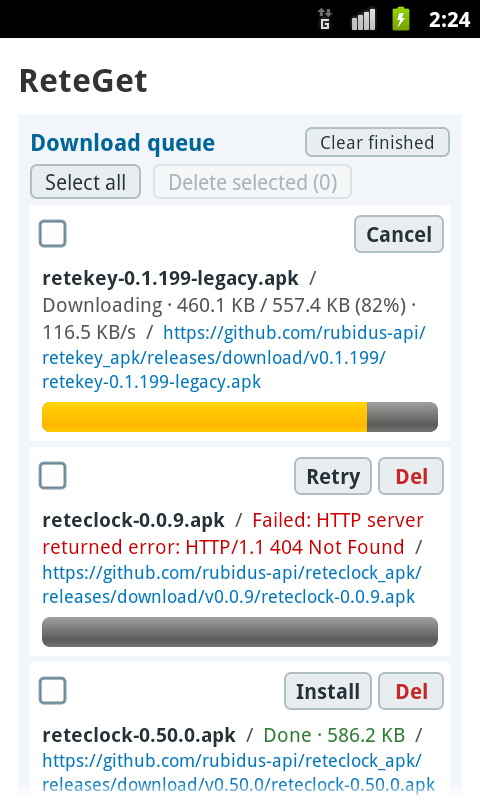
* Download queue at the top of the screen: one download at a time, with the file name, state, URL and a progress bar for each entry. Failed downloads say why and can be retried; finished APKs can be installed from the list. Select all / Delete selected. The list survives closing the app.
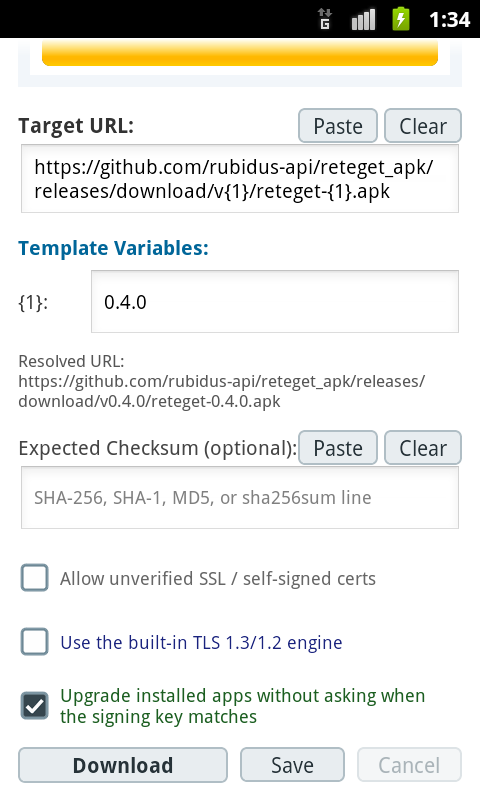
* URL templates: a URL such as .../download/v{1}/app-{1}.apk shows a small field for {1}, so an update is just a new version number.
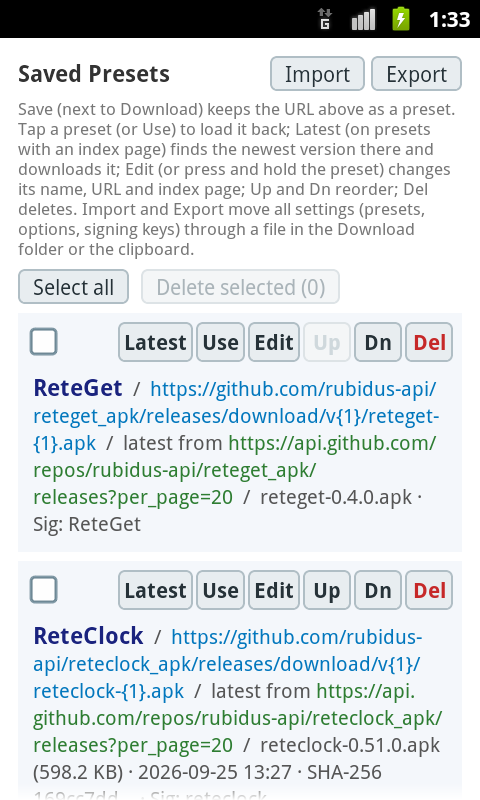
* Presets with names, including the rete series (ReteGet, ReteClock, ReteKey) with their expected checksums and signing keys filled in. Use, Edit, Up, Dn and Del on each preset.
* Latest: a preset can name an index page (a directory listing, or GitHub's releases API); Latest downloads the newest file there that fits the preset URL, in Windows Explorer order (0.3.10 after 0.3.9). The rete presets come with it.
* Checksum check: SHA-256, SHA-1, MD5 and SHA-512, pasted as a bare hash or a sha256sum line.
* APK signing-key check: warns when an APK is signed by a different key than the installed app or the last download of it.
* Installs APKs with the system installer; for an upgrade with the same signing key and a newer version it opens the installer right away, and you confirm there.
* HTTP, HTTPS, passive FTP, FTPS (ftpes://, ftps://) and SFTP.
* FTPS with its own TLS, reusing the TLS session on the data connection as servers require; a self-signed certificate is confirmed by fingerprint once and then pinned.
* SFTP with its own SSH-2 client (works on Android 2.3): the server's host key fingerprint is confirmed on first use and a changed key is refused; log in with a password or with a key generated on the phone or imported from OpenSSH (Ed25519, RSA), chosen per address or preset. Keys with a passphrase stay encrypted on the phone.
* Browse server folders over SFTP, FTP, FTPS and http(s) (WebDAV or an index page): check files and folders and download them, folders with their subfolders.
* An https download that the server redirects to plain http stops and asks first.
* Broken HTTP downloads continue where they stopped (Range with If-Range): automatically up to three times, and with Retry, also after the app was closed.
* Password-protected servers: http://user:password@host/path, answered with Digest (SHA-256, MD5) or Basic only when the server asks, and only to that address. Passwords are shown as *** and left out of settings exports.
* Settings export and import (presets, options, signing keys) as a plain text file in the subset of INI and TOML that both read the same way, or through the clipboard.
* Saves to the system Download folder; when shared storage is unavailable, to the app's own storage, from where APKs can still be installed.
* Paste and Clear buttons for the URL and the checksum.
Small and self-contained: plain Java and the Android framework, no third-party libraries, a single dex file, built without Gradle.
The option to allow unverified certificates exists for home servers with self-signed certificates; leave it off otherwise.
Old phones are cut off from most of the web. Android 2.3 has no TLS 1.2 at all, and Android 4.1 devices such as the Galaxy Note 2 fail against modern servers with "SSLv3 alert handshake failure". So ReteGet carries its own TLS client, written in plain Java: TLS 1.3 (X25519 or P-256, AES-128-GCM, ECDSA and RSA-PSS server signatures), and TLS 1.2 only for servers without TLS 1.3, with downgrade protection. Because Android 2.3 cannot verify ECDSA certificates such as GitHub's, the app also parses X.509 certificates and validates the chain itself, against the system and the bundled root certificates, and always checks the host name. The system TLS is tried first; the built-in engine takes over when it fails, or always, if you tick the option.
Features
* Download queue at the top of the screen: one download at a time, with the file name, state, URL and a progress bar for each entry. Failed downloads say why and can be retried; finished APKs can be installed from the list. Select all / Delete selected. The list survives closing the app.
* URL templates: a URL such as .../download/v{1}/app-{1}.apk shows a small field for {1}, so an update is just a new version number.
* Presets with names, including the rete series (ReteGet, ReteClock, ReteKey) with their expected checksums and signing keys filled in. Use, Edit, Up, Dn and Del on each preset.
* Latest: a preset can name an index page (a directory listing, or GitHub's releases API); Latest downloads the newest file there that fits the preset URL, in Windows Explorer order (0.3.10 after 0.3.9). The rete presets come with it.
* Checksum check: SHA-256, SHA-1, MD5 and SHA-512, pasted as a bare hash or a sha256sum line.
* APK signing-key check: warns when an APK is signed by a different key than the installed app or the last download of it.
* Installs APKs with the system installer; for an upgrade with the same signing key and a newer version it opens the installer right away, and you confirm there.
* HTTP, HTTPS, passive FTP, FTPS (ftpes://, ftps://) and SFTP.
* FTPS with its own TLS, reusing the TLS session on the data connection as servers require; a self-signed certificate is confirmed by fingerprint once and then pinned.
* SFTP with its own SSH-2 client (works on Android 2.3): the server's host key fingerprint is confirmed on first use and a changed key is refused; log in with a password or with a key generated on the phone or imported from OpenSSH (Ed25519, RSA), chosen per address or preset. Keys with a passphrase stay encrypted on the phone.
* Browse server folders over SFTP, FTP, FTPS and http(s) (WebDAV or an index page): check files and folders and download them, folders with their subfolders.
* An https download that the server redirects to plain http stops and asks first.
* Broken HTTP downloads continue where they stopped (Range with If-Range): automatically up to three times, and with Retry, also after the app was closed.
* Password-protected servers: http://user:password@host/path, answered with Digest (SHA-256, MD5) or Basic only when the server asks, and only to that address. Passwords are shown as *** and left out of settings exports.
* Settings export and import (presets, options, signing keys) as a plain text file in the subset of INI and TOML that both read the same way, or through the clipboard.
* Saves to the system Download folder; when shared storage is unavailable, to the app's own storage, from where APKs can still be installed.
* Paste and Clear buttons for the URL and the checksum.
Small and self-contained: plain Java and the Android framework, no third-party libraries, a single dex file, built without Gradle.
The option to allow unverified certificates exists for home servers with self-signed certificates; leave it off otherwise.