Webmote – Remote for LG TV
Control your LG webOS TV from your phone: remote, volume keys, widgets, power.
Version: 0.1.0
Added: 20-11-2026
Updated: 20-11-2026
Added: 20-11-2026
Updated: 20-11-2026
Webmote turns your phone into a fast, private remote for LG TVs running webOS (2018 models and later). Open it and press a button, or don't open it at all: use a Quick Settings tile, a home-screen widget or your phone's volume keys.
Everything on one screen
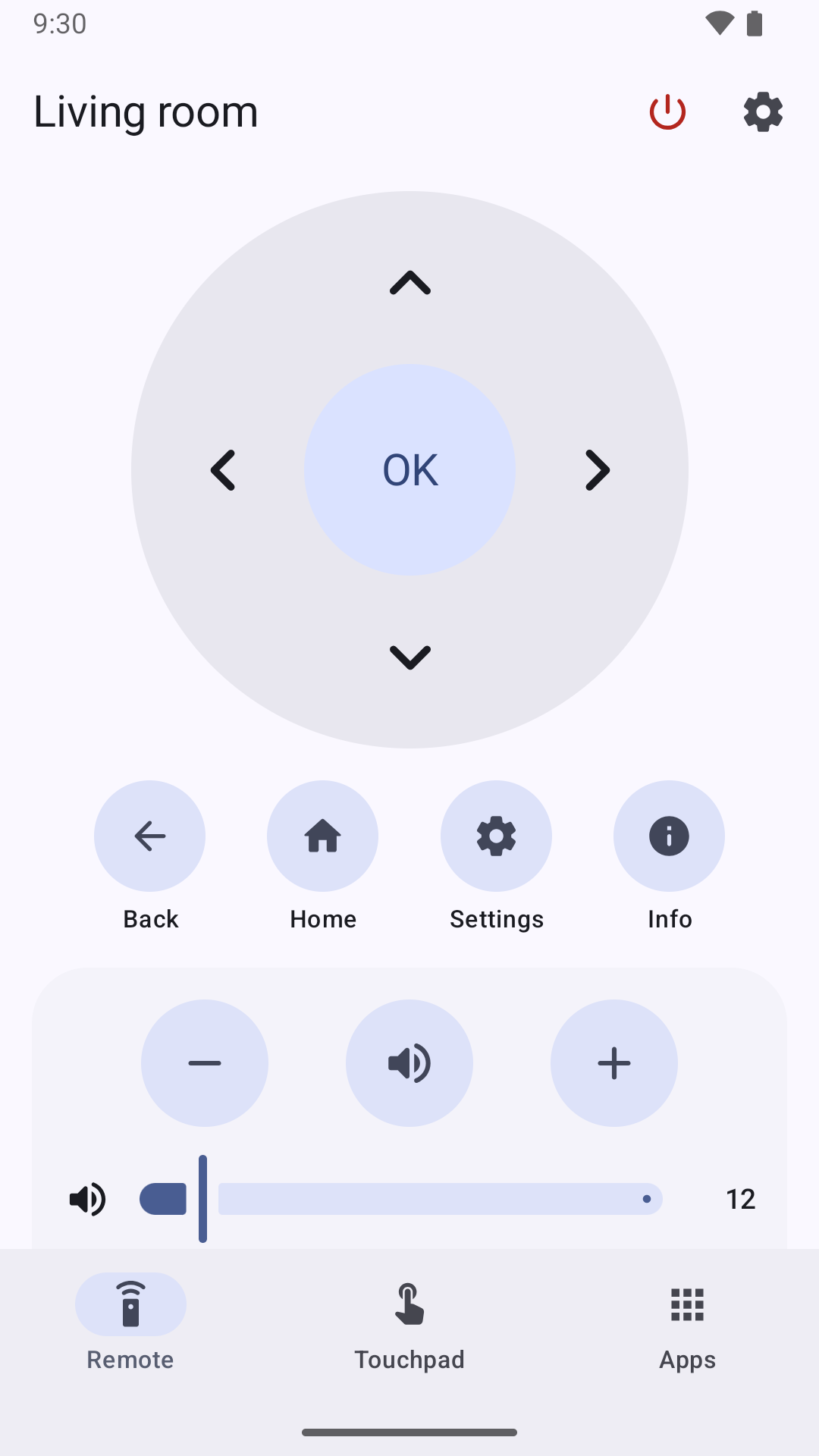
• D-pad with OK, Back, Home, Settings and Info
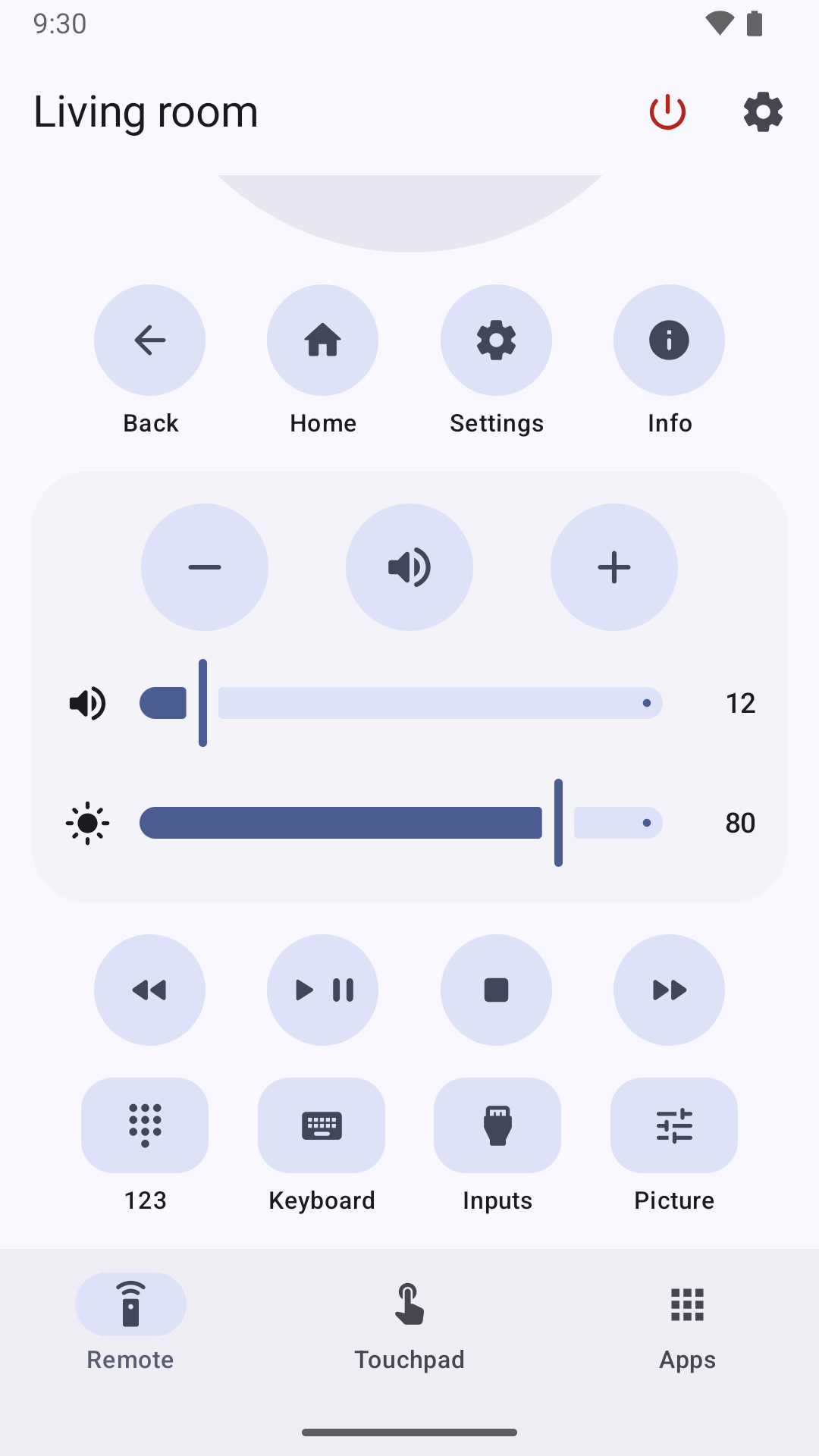
• Volume slider that follows the TV's real level, with mute and ±
• Brightness slider (backlight, or OLED light on OLED sets)
• Play/pause, stop, rewind and fast-forward
• Input picker (HDMI 1, 2, 3…)
• 123 pad with channels and the red, green, yellow and blue keys
• Live keyboard: type on your phone and the text appears on the TV as you type
Picture settings
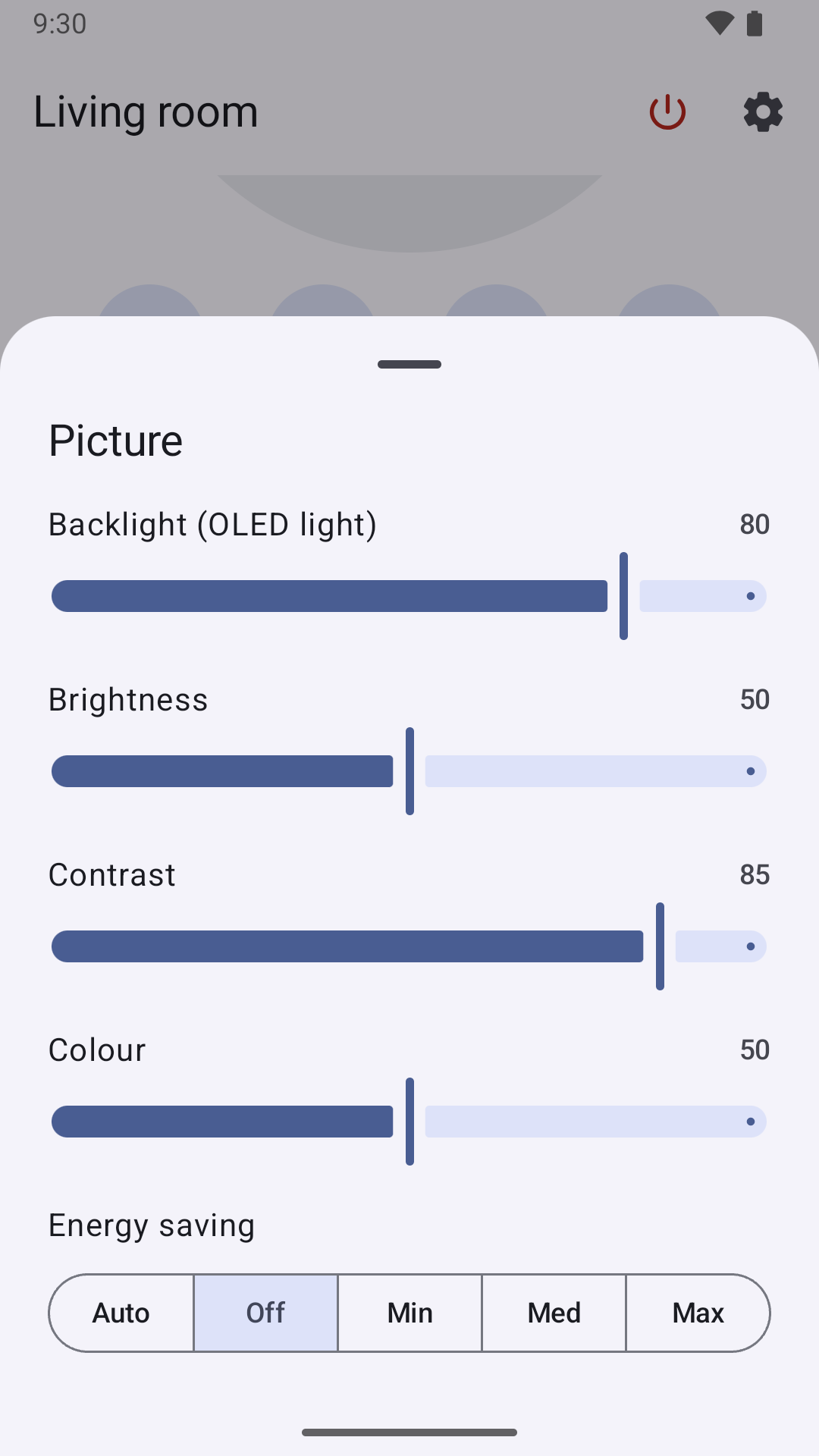
Adjust brightness, contrast, colour and energy saving from a Picture sheet that shows the TV's current values. If your TV ignores picture changes, Webmote greys the controls out and tells you why instead of pretending they work.
Touchpad and apps
Move the TV's pointer like a Magic Remote, tap to click and scroll with two fingers. Launch Netflix, YouTube and the rest from a grid of your TV's apps, and pin your favourites to the top.
Without opening the app
• Quick Settings tiles: Power, Mute, Screen off (sound keeps playing) and Open remote
• Two home-screen widgets: a 4×1 strip and a 4×2 mini remote
• A notification with −, mute, + and power while the TV is on
• Your phone's volume keys change the TV's volume, even with the phone locked (you can turn this off)
Turn the TV on
When the TV is off, one tap on Turn on wakes it with Wake-on-LAN, and the remote appears as soon as it answers.
Several TVs
Save every TV in the house, rename them ("Living room", "Bedroom") and switch between them from the top bar.
Private by design
No account, no analytics. Webmote talks only to your TVs on your own network. Each TV's security certificate is recorded when you pair it, so another device can't pretend to be your TV.
Requirements
• An LG TV with webOS 4 or later (2018 models onwards), on the same Wi-Fi network as your phone
• To turn the TV on from your phone, enable "Turn on via Wi-Fi" (Settings → General → Mobile TV On) or, on 2025 models and later, Wake on LAN (Support → IP control settings)
In English and French.
Webmote is an independent app. It is not affiliated with, endorsed or sponsored by LG Electronics. LG and webOS are trademarks of LG Electronics Inc. Netflix and YouTube are trademarks of their respective owners.
Everything on one screen
• D-pad with OK, Back, Home, Settings and Info
• Volume slider that follows the TV's real level, with mute and ±
• Brightness slider (backlight, or OLED light on OLED sets)
• Play/pause, stop, rewind and fast-forward
• Input picker (HDMI 1, 2, 3…)
• 123 pad with channels and the red, green, yellow and blue keys
• Live keyboard: type on your phone and the text appears on the TV as you type
Picture settings
Adjust brightness, contrast, colour and energy saving from a Picture sheet that shows the TV's current values. If your TV ignores picture changes, Webmote greys the controls out and tells you why instead of pretending they work.
Touchpad and apps
Move the TV's pointer like a Magic Remote, tap to click and scroll with two fingers. Launch Netflix, YouTube and the rest from a grid of your TV's apps, and pin your favourites to the top.
Without opening the app
• Quick Settings tiles: Power, Mute, Screen off (sound keeps playing) and Open remote
• Two home-screen widgets: a 4×1 strip and a 4×2 mini remote
• A notification with −, mute, + and power while the TV is on
• Your phone's volume keys change the TV's volume, even with the phone locked (you can turn this off)
Turn the TV on
When the TV is off, one tap on Turn on wakes it with Wake-on-LAN, and the remote appears as soon as it answers.
Several TVs
Save every TV in the house, rename them ("Living room", "Bedroom") and switch between them from the top bar.
Private by design
No account, no analytics. Webmote talks only to your TVs on your own network. Each TV's security certificate is recorded when you pair it, so another device can't pretend to be your TV.
Requirements
• An LG TV with webOS 4 or later (2018 models onwards), on the same Wi-Fi network as your phone
• To turn the TV on from your phone, enable "Turn on via Wi-Fi" (Settings → General → Mobile TV On) or, on 2025 models and later, Wake on LAN (Support → IP control settings)
In English and French.
Webmote is an independent app. It is not affiliated with, endorsed or sponsored by LG Electronics. LG and webOS are trademarks of LG Electronics Inc. Netflix and YouTube are trademarks of their respective owners.